Validation & trust
The model-level validation record, the build's own proof and independent review, the requirements ledger, and RIA's review of a solved model.
Every model carries one validation record. It answers three questions separately, and it never answers them from a stale run without saying so.
The badge
The verdict sits beside the model's name on model home —
Validated, Warnings, Not passing, Stale, or Not validated — followed by the
tally: {n} blocking, {n} warn, {n} pending. A model that has never been checked shows no badge.
Pending counts both checks that haven't run and checks that can't be machine-checked, so a
passing verdict never reads as complete while something is outstanding. When the checks predate
the current model the badge carries a warning dot and reads "Some checks predate the current
model — open to re-run".
Click it to open the record.
The record
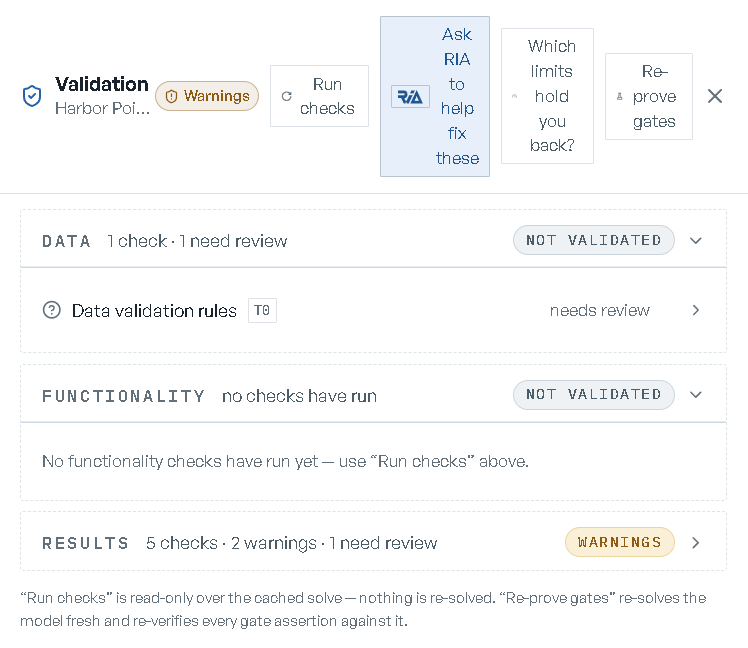
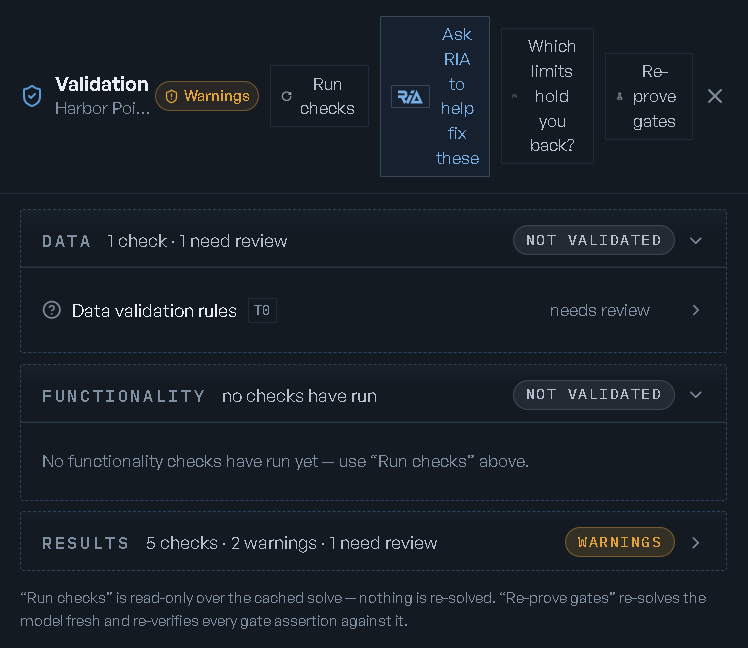
The three pillars
| Pillar | The question it answers |
|---|---|
| Data | Is the data loaded and internally consistent? |
| Functionality | Does the model do what you asked for? |
| Results | Are the results sound? |
Each pillar carries its own verdict and a one-line summary of what's behind it — how many checks ran, how many are blocking, how many are warnings, how many need review, how many are stale. A failing pillar opens expanded; the rest ship collapsed. A pillar nothing has run in says so, and points at Run checks.
Checks
Inside a pillar, each check is a row: its name, a tier chip, its status, and how many findings it has. Failing checks sort to the top and open automatically. The hover ▶ — "Re-run this check" — re-runs that one check alone.
The tier is what the check costs to run:
| Tier | Cost |
|---|---|
| T0 | instant |
| T1 | reads the solve already computed |
| T2 | reads the optimization engine |
| T3 | needs a fresh re-solve |
Statuses are pass, failing, stale, skipped, check crashed, needs review, and
pending. Two of those are deliberate: a check that raised an error reports check crashed
rather than quietly passing, and a check nobody can verify by machine reports needs review
rather than a verdict it hasn't earned.
What's registered today, by pillar:
- Data — Data validation rules, Table contracts, Imported artifact sanity.
- Functionality — Structural lint and Engagement gates (the assertions that prove each capability the model claims is actually engaged).
- Results — Gate-proof currency, Structural invariants, Result verification (traces + reconciliation), Revenue KPI cross-check, Workbook reconstruction fidelity, a rating of the quality of the answer that was found, and the two re-solve checks the drawer's buttons run.
Expanding a check lists its findings: a red mark for a blocking one and a warning triangle
otherwise, where it is ({table} · row {n} · {column}), the message, and the suggestion on its
own line. Twenty-five show, then + {n} more. A clean check that has nothing to add says
"No findings."
Running the checks
Four buttons sit in the drawer header, and they cost different things:
- Run checks — "Re-run the instant + cached-solve checks (no re-solve)." Read-only.
- Which limits hold you back? — re-solves at the current plan and reports which of your limits are actually holding it back, and which cost you nothing.
- Re-prove gates — "Re-solve the model fresh and re-verify every gate assertion."
- Ask RIA to help fix these — only when at least one check is failing or crashed. It stages the failing checks into the console, ready to send, and closes the drawer.
Each of the two re-solve buttons runs exactly one check, so opening the record can never spend a fresh re-solve per check by accident.
The drawer states the distinction itself: "'Run checks' is read-only over the cached solve — nothing is re-solved. 'Re-prove gates' re-solves the model fresh and re-verifies every gate assertion against it."
Staleness is never hidden
If the model moved after the checks ran, the drawer says which revision each side is on — "Checks ran against rev 4; the model is at rev 6. Run checks to refresh." Affected pillars show a Stale chip and their summary gains "— stale (model changed since)". A stale verdict is never served as a current one.
Disclosures
Real caveats about the record are pulled to the top of the drawer rather than buried inside a check's detail. The list is problems-only and at most four long, worst first — so anything appearing there is worth reading. What shows up: accepted requirements that aren't yet verified against real data, a gate proof that predates a structural change, a capability whose check couldn't be run and why, or a headline number that includes an estimated amount rather than booked economics.
Accepting a blocking finding
Some blocking findings are true and still acceptable for your model. On a failing Engagement gates check, Accept knowingly records that decision — with a reason, which is required: "Accepting … blocking finding(s) records a decision against this revision — a reason is required." The field asks "Why are these acceptable for this model?"
Afterwards the row names who accepted it and quotes their reason, and states the rule: "Recorded in the audit log. Editing the model returns these to blocking." The acceptance is stamped against the revision it was made on, so it stops applying the moment the model changes.
No other check offers the override. A check that can't record one shows no button rather than one that wouldn't work.
Certification
Certification is the rollup, not the same thing as validation: it folds the gate proofs, the validation record, the independent review and the requirements ledger into one seal pinned to a revision. It reads Certified, Certified with concerns, Checks not passing, or Not yet certified, and gains "· predates latest changes" once the model has moved past the revision it was computed on.
A seal that predates later edits is normal, not a failure. Checks not passing is marked as a
warning rather than an error for the same reason — a re-check always exists. Certification is
never recomputed as a side effect of opening a screen; re-certifying is something you ask for.
You'll see it on the Develop zone and on each revision in the timeline. See Changing a model.
The requirements ledger
Requirements on model home is the ledger of what you said
you needed, each with an honest verdict. Its summary line is {n}/{n} verified, plus how many are
in place, not met, need review, or are waiting on you to confirm; a model that has never been
seeded reads not seeded yet. If any requirement is not met, the zone carries a Not passing
chip and opens itself. If the model changed after the last check, the summary says "— model
changed since".
An empty ledger says where its contents would come from: "No requirements captured yet. Seed them from what you told the system (brief, interview answers), or add one below." Seed from what I said reads your brief and your interview answers and proposes the list.
Rows group by what you'd do about them, not by verdict:
- Needs your input — "Proposed items waiting on you to confirm or dismiss them." Each row has Confirm this requirement and Dismiss — not a requirement.
- Gaps — "Confirmed requirements the model does not currently satisfy." Tick the ones worth carrying and press the back & rebuild once button — "Re-adds these capabilities and rebuilds the model. Revertible."
- Built & running — "Confirmed and carried by the design — proof detail on each row."
Every row says where it came from ("from your brief", "from the import interview",
"from chat", "added by you") and what its verdict is, in words rather than codes: verified,
in place - values unchecked, not met, needs review, pending, to confirm, or
accepted - not machine-verified when a person signed it off and no machine can.
Add one yourself in the field at the bottom — "Add a requirement (e.g. 'gross margin at least 20%')" — and press Add. Check now re-checks every requirement against the current model and its solve.
Review & improve
Separate from validation: Review & improve has RIA read the model and its solve and propose improvements. Reach it from the Review & improve door card on model home, which opens the Develop zone where the review lives.
Review the model runs it — Review again after that. While it runs: "RIA is reviewing the model and its solve…" The basis is stated with the result: the best result, how long the solve took, how many checks passed, how many scenarios there are, and how many of the model's capabilities were used.
It needs a solved Base first — "Solve the base scenario first — then RIA can review the results and propose sharper improvements." When nothing surfaces it says so instead of padding: "No improvements surfaced — the model looks well-built on the dimensions RIA checked. Ask about a specific aspect below."
You can also point it somewhere specific. Ask RIA to look at something takes a sentence — its
own examples are "how could I speed up the solve?" and "is the product mix leaving margin on
the table?" — and a filed proposal echoes Added to your backlog: "{title}".
Deciding on the proposals
Proposals come one at a time, each with its impact (High impact / Medium impact / Low impact), a category — Performance, Functionality, Efficiency, Effectiveness — a Why this? fold carrying the rationale and the evidence behind it, and the next step it implies. Three dispositions:
| Disposition | What it does |
|---|---|
| Take it | opens the proposal's row on the backlog, where the work actually happens |
| Later → | leaves it on the list, undecided |
| Set aside | dismisses it with a reason — "Why set this aside? RIA won't raise it again." |
Nothing is applied from this walk: "Nothing is changed until you apply an item from your backlog.
Take what's worth doing, leave the rest for later." Once you've decided, the footer tallies
{n} taken · {n} for later · {n} set aside, and Open your backlog takes you to the executor.
See Changing a model.
The build's own evidence
Every build leaves its own evidence: the checks it ran, an independent review of the model against your brief, and a drawer for modellers that shows how each rule was built. You meet it first on the Build step, under What the build found on the Building page and folded open on Review (see Building models). Afterwards it stays on the model: the Credentials door on model home opens the build record with all three.
The proof ledger
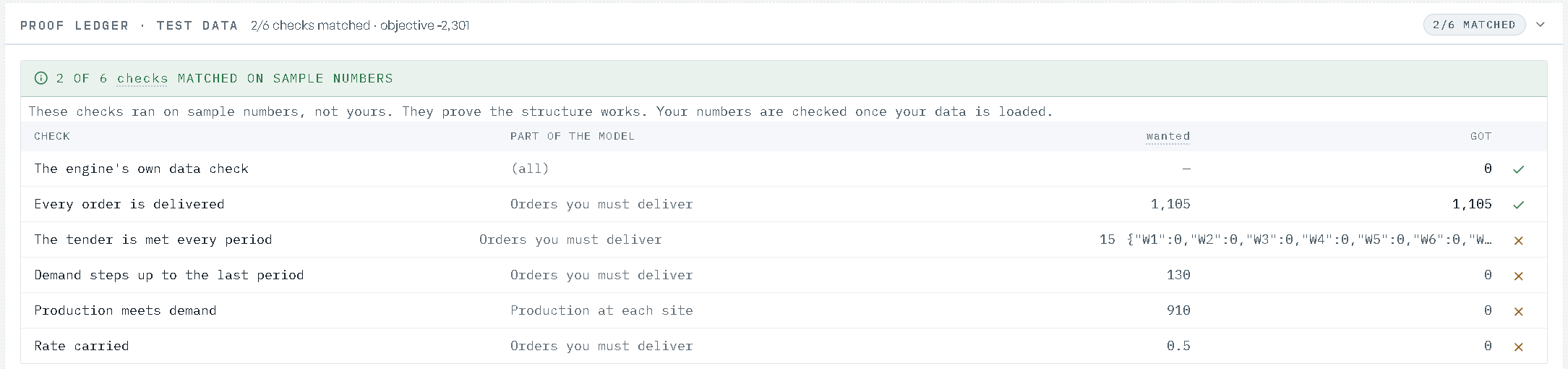
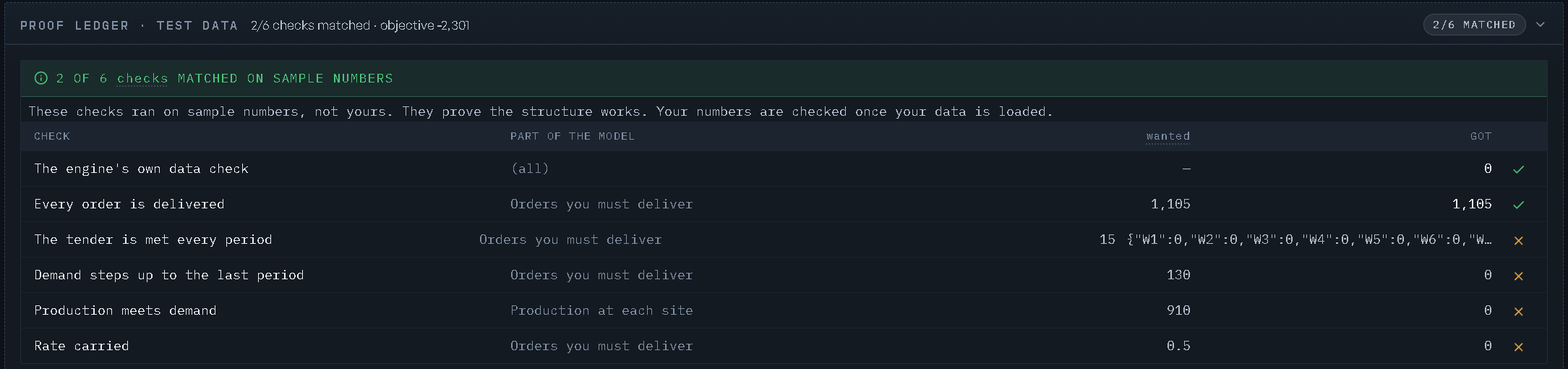
The build's checks read as a ledger. Its banner states the verdict:
{n} of {n} checks passed · verified in a fresh sessionwhen every check passed;{n} of {n} checks matched on sample numberswhen the model was built on sample numbers, with the note "These checks ran on sample numbers, not yours. They prove the structure works. Your numbers are checked once your data is loaded.";Checks not passing · {n} of {n} passedotherwise.
The columns are Check, Part of the model, wanted and got. Each check is named in words, such as "Every order is delivered" or "Equipment stays within its hours", and the part of the model it tests is named by its plain title. On the Credentials record the ledger is headed Proof ledger · test data until your data is loaded, and Proof ledger · your data after, and it opens by itself when a check did not pass.
The independent review
A separate reviewer reads the built model against your brief and reports what it thinks is missing and what it thinks was invented. It is advisory: it never blocks the build or the sign-off.
Its seal shows the reviewer's confidence as a percentage, then the round (after the design, after the build, or after the solve) and advisory. While the review is still running the seal reads EXAMINING; you don't need to wait for it.
Each round shows, newest first:
- the reviewer's rationale, in a paragraph;
- How this was scored, a fold holding four scores out of 5: Matches your brief, Covers what you asked for, Built correctly, Honest about its limits;
- Missing: what your brief asked for that the model lacks, each with the quote from your brief and why it matters;
- Added without a basis in your brief: what the model gave itself that your brief does not support, and why;
- Things we added, and whether your brief backs them: each addition marked
backedornot backed.
Before a review has run: "No review yet. The independent review runs after the checks."
Deciding on a miss
On the Build step, every miss carries two buttons:
| Button | What it does |
|---|---|
| Add it | drafts the change from the review's own evidence and applies it: "Added. The model was rebuilt with it as a new revision." The miss then reads Added. If the miss needs your words before it can be built, it is filed instead ("Filed. It needs a description before it can be built: the Develop zone has it.") and the model's Develop backlog opens on it |
| Leave it out | records that you decided against it. The miss reads Left out, with Undo to reverse the decision |
Every miss is also an item on the model's backlog, under Gaps vs your brief, so it can be worked later; one you left out sits in You set aside with the reason "Left out at the independent review". See Changing a model. On the Credentials record the seal opens the same review as a read-only drawer, headed Independent review.
How this is built
How this is built (for modellers) is a collapsed drawer for readers who want the mechanics. It holds only what the Model Design card does not, and each zone states its numbers in its header even while collapsed. It sits on the design pause before a build, on the Credentials record, and on the review of your data once it has been read.
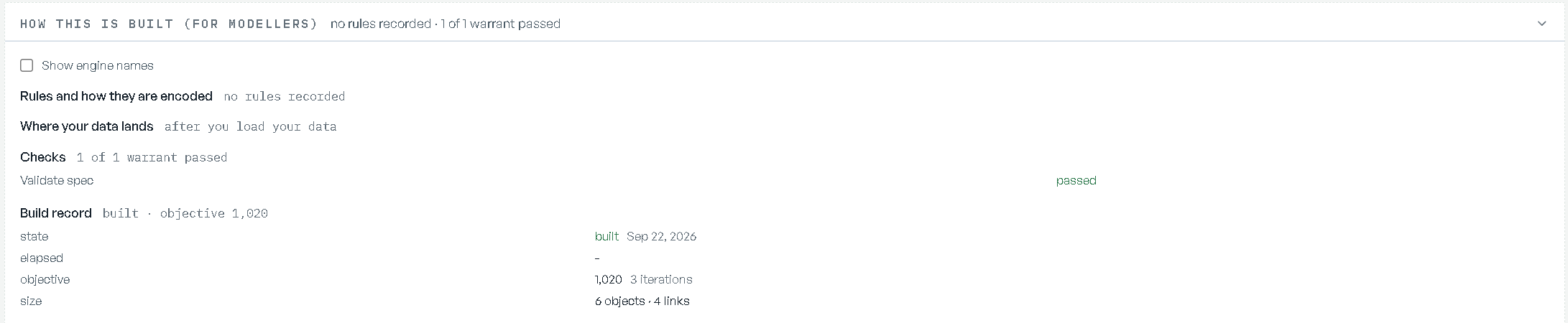
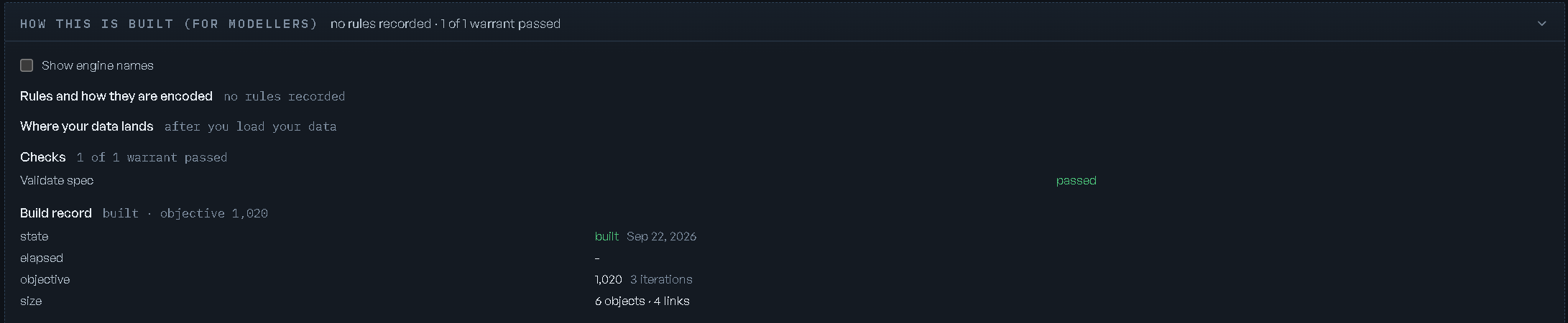
| Zone | What it shows |
|---|---|
| Rules and how they are encoded | each rule by its plain title, and whether it is proven on this model, proven on the catalog, or not yet proven. The header counts {n} rules · {n} proven on this model · {n} proven on the catalog, or reads no rules recorded |
| Where your data lands | each source column and where it lands, with the row counts at each stage and whether they agree. Before your data is loaded: after you load your data |
| Checks | the build's checks in words, each passed or failed, with wanted {n} · got {n} where the check compares numbers, and the sample-numbers note when it applies. Before the build: run once the model is built |
| Build record | whether it built, the time each phase took, the total, the objective, and the model's size. Before a build: no build has landed on this record yet |
| Limitations | only when the build stated some |
A footer line identifies the record: its number, a short fingerprint, and who confirmed it and when. Show engine names, off by default, adds the technical name behind each row for modellers who work in them.
The other trust surfaces
Validation is the model-level record. Three others cover different scopes:
- The design sign-off — the one-time gate before a new build is accepted. See Building models; its evidence is the build's own evidence, above.
- Verify — per-scenario evidence: the result, the inputs it used, the checks run, and the trail. See Scenarios & what-ifs.
- RIA Review — per-stage findings inside a workflow run, each tagged with provenance and confidence. See Workflows & runs.