Changing a model
The Develop backlog, change orders proved on a trial solve, and the revision timeline — how a model changes without anyone losing track of why.
A model that's used gets changed. Every structural change goes through the same sequence — propose, prove it on a trial solve, apply, record a revision — and every one of them can be reverted.
Changing numbers is different, and simpler: see Editing data.
The Develop backlog
Develop is the body of Step 5 Backlog on
model home. Its summary line is
Your model's backlog — …: how many items are open, how many are gaps against your brief, how
many have been applied. Empty, it reads "Nothing open — ask RIA for ideas or run a review." The
zone ships collapsed and opens itself when there are gaps.
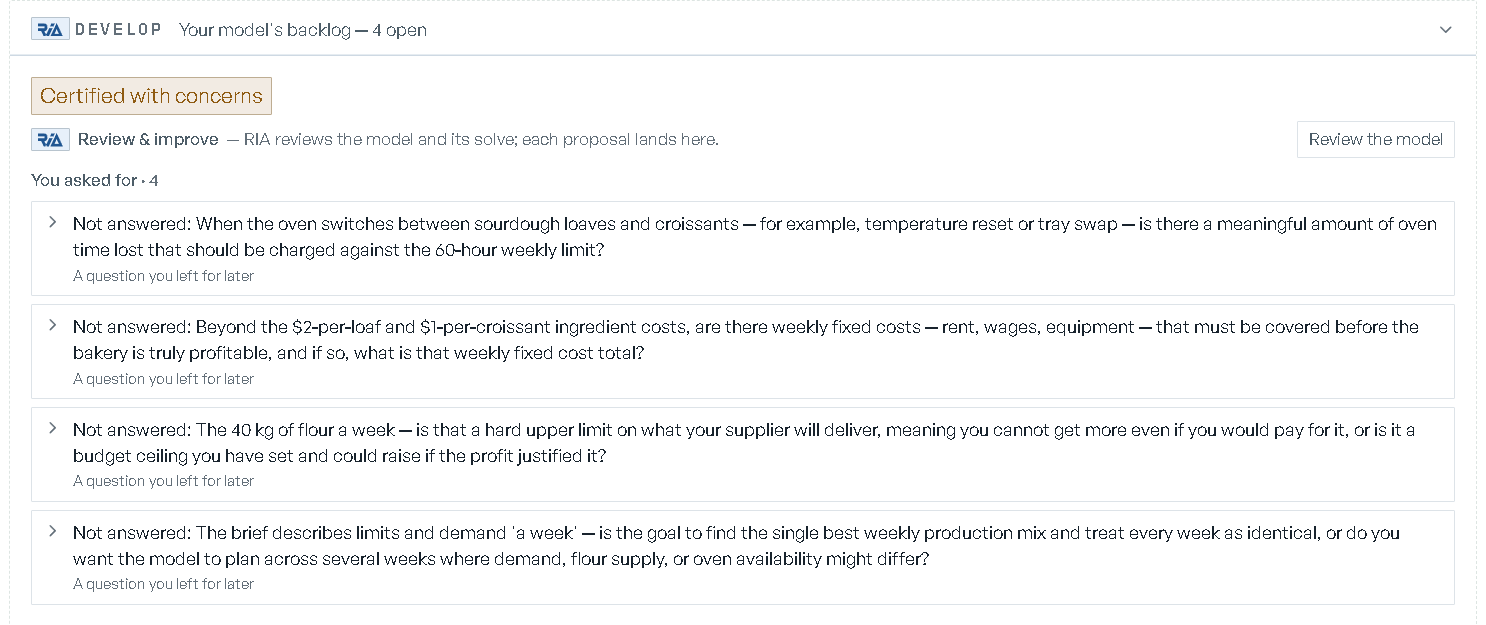
At the top of the zone sits the model's certification — its label, how many gates are proven of how many, and the review's confidence. When it's stale or failing, a Re-check link opens the validation record. See Validation & trust.
Items are grouped by where they came from:
| Group | What's in it |
|---|---|
| Gaps vs your brief | limits you stated that the build did not carry, and misses the independent review found |
| You asked for | your own requests, suggested improvements, questions you left for later |
| Data | changes your data implies, and drift the platform noticed |
| Set aside when we built it | "Things the brief asked for that this build left out. Preview or work on one to bring it in." |
Each row also names its own source in one line — "A limit in your brief", "Flagged by the independent review", "From a what-if you liked", "Your data changed", "An unmet requirement", and so on — so no item arrives without provenance.
A model with nothing on the backlog at all reads "Nothing to develop yet. Rebuild the roadmap from your brief and the model's own design, or ask RIA in chat for an improvement." with Rebuild the roadmap.
Working an item
Open a row and it shows the detail, the quote it came from, the proof block, and only the ways forward that can actually succeed.
| Action | When it's offered | What it does |
|---|---|---|
| Preview | the item is already a specific, buildable change | proves it on a trial solve and fills in the proof block |
| Apply | the preview came back feasible | applies the change |
| Run as what-if | the item is really a scenario | creates and runs the what-if, then opens Scenarios |
| Build it into my model | beside Run as what-if, for when you want the idea in the model every scenario starts from rather than tried in one | opens the console with the item pinned as its subject and the request written for you: "Build this into my model itself, not as a what-if, so every scenario starts from it:" followed by the item's title in quotes. Send it and RIA drafts it as a change to the model, for you to preview and apply; see Change orders from the console |
| Work on this | the item is neither specific nor a what-if | asks RIA to draft it as a concrete change |
| Add to my description | the model was built from a written brief | hands the item's text to Step 1 Your input and re-opens the questions |
| Set aside | always | dismisses it with a required reason — "Why set this aside? (e.g. this doesn't apply to us)" |
The proof block is headed "What this does (proven on a trial solve)" and reads either
now $… → after $… with the delta, or what a KPI "would read … on the base plan", plus an
infeasible chip when the change can't be made to work.
When a preview can't run, the row says which kind of obstacle it hit:
- "This one needs to be described as a specific change before it can be previewed." — with Ask RIA to draft it, which pins the item as the console's subject and pre-fills the question for you.
- "The tool can't build this capability yet — tracked as demand, not a to-do."
- "That took too long to come back — the engine may still be working on it." — with Try again, which retries the same call.
Applying says exactly what it promised, and the three answers differ:
- A change that means rebuilding the model: "Rebuilding the model with '…'. You will review the Model Design before it builds; the change is marked applied when the rebuild lands."
- A change that minted a revision: "Applied '…' — new revision N created. Revert any time from the version history; stale scenarios can be regenerated from Scenarios."
- A change that moved nothing structural: "Applied '…'." — no revert story, because there's nothing to revert.
Nothing is dropped quietly. Items the platform can't build sit in Recognized, not buildable yet — "These are honest gaps in what the tool can build today — we track them as demand for what to build next." Items you dismissed sit in You set aside — "Things you told us do not apply. Take back to reopen one." — with your reason on each row and Take back to reopen it. A miss you chose to leave out at the independent review lands here too, with the reason "Left out at the independent review".
Having RIA propose new items is covered in Validation & trust.
Change orders from the console
Ask RIA for a change in the console and it comes back as a card you approve — never applied silently. See RIA console.
An item RIA filed on the backlog arrives as a change-order card: the title, the model and backlog group it was filed on, the same proof block, and the same three controls — Preview, Apply, Set aside with this reason — plus Open in Develop to work it in place. Applied, it reads "Applied — version N." and then either "The model is rebuilding and will pause at its Model Design first." or "Revert any time from the model's version history."
A direct edit arrives as a model edit card instead, tagged model edit or what-if, with the
proof above the buttons:
BaseandProposed, with the delta and percentage between them.- Whether the proposal is
feasible, and whethervalidation passed. - What changes (N) — the field-level diff, each line from → to.
Then Apply or Discard. If the change doesn't survive validation you get a route rather than a dead end: "That change needs a tweak first", each finding with its diagnosis and a concrete try this workaround, and Dismiss.
Hiding a change-order card from the console leaves the item filed on the backlog. How the console queues its cards is covered in RIA console.
The revision timeline
Change history is the model's evolution written as a story. Reach it from the maturity line on model home — the one that counts the changes "since the first build" — with See history →.
- Each revision reads as a plain-English headline, never a code: "Brought in your real data", "Changed what the model optimizes for", "Made a scenario permanent", "New capability: …", "Reverted to revision N".
- Beside it: what the revision did to the objective, the revision number, who made it and when, and where it came from — "from the independent review", "you asked for it", "from a what-if you kept", "your data", "a gap in your brief".
- The certification the change landed at rides on the row, marked as predating later changes when
it does. The head revision carries a
currentchip. - Filter by family: All, Structural, Data.
- The header totals the movement
in objective since the first build, over a spark of the objective across revisions. Both appear once the model has two or more revisions.
Selecting a revision opens its detail:
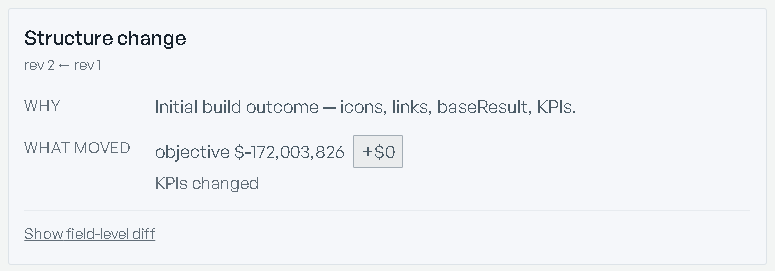
- Why — the request or brief quote it came from.
- What moved — the objective before and after, capabilities added or removed,
KPIs changed. When nothing solve-affecting moved, it says so. - Undo — on any revision that isn't the head: Revert to this revision, then an inline confirm naming the revision, with Revert / Cancel.
- Show field-level diff — the exact fields that changed against the parent revision.
Before any change has landed, the screen says so plainly: "No changes recorded yet" — "Every structural change to this model is tracked here as a revision — with what it did to the objective and its certification. Make a change from Develop and it appears on this timeline."
The timeline is what the model is. Renames, permission edits, locks and promotions don't mint revisions — they're recorded in the Audit log.
Versions and the audit log
Both are header buttons on model home, and both are on every Model Library row.
Version history lists the snapshots — rev 0001 upward, who made each one, a Head chip
on the current one, and chips summarizing the diff — icons and links added or removed, KPIs changed,
Topology changed. The diff link against the parent revision expands a Field / From / To
table in place.
Revert rolls a non-head revision back; the confirm states that a checkpoint is taken first,
so the revert is itself reversible. Reverting is limited to owners and org admins — everyone else
sees "Owners and org admins can revert. You can view + diff." — and a locked model must be
unlocked first. A brand-new model reads "No versions yet — the first mutation will snapshot
rev-0001."
Audit log is the event record: filter by All, Locks, Promotions, Authoring, Scenarios, Data, Workflows + runs or Permissions, and by actor. Every event is written as a sentence rather than an action code. It shows the most recent 300 events, and it is append-only — "rev pruning never touches events."
Re-authoring the whole model
For when the description itself was wrong, not one number in it:
- Step 1 Your input on model home is where you reopen it: Edit to change the brief and Change answers to revisit what you told the interview, both in place on the step. A model built from a workbook offers Replace the workbook instead — "Upload a corrected .xlsx; the model re-reads it and re-asks its questions with your answers kept."
- Step 2 Model Design offers Send back once the design is accepted: the model "returns to its questions with your answers kept", and your reason is recorded on it. The model's baseline is cleared until it is solved again, and the Build step's Check the design page lists your reason under What you asked to be corrected.
Scenarios solved against the old structure are marked stale with the revision they were solved
against, rather than
silently reused; see Scenarios & what-ifs.